Plans and Usage Limits
PRV-Sizing is metered per action rather than per seat or per hour. This page explains the rules. For the actual numbers on each plan, see the pricing page, which is the single place those figures are maintained.
What Gets Counted
Four separate allowances, counted independently.
| Allowance | Consumed by |
|---|---|
| Solver runs | Each Run, and each solve the AI assistant performs on your behalf |
| PDF reports | Each Download Report (PDF) |
| CSV exports | Each Export Data (CSV) |
| AI tokens | Text exchanged with the AI assistant, on plans that include it |
They do not share a pool. Exhausting your PDF exports does not stop you solving, and a plan with generous solver runs may still have a modest export allowance.
There is also a rate limit, expressed per minute, which is separate from the monthly allowance. It caps how quickly you can submit solves, not how many you get in total. Hitting it means waiting a moment, not that you have run out.
What Does Not Get Counted
- Loading the tool and its built-in databases
- Changing parameters, switching units, uploading CSV files
- Saving or loading a configuration file
- Interacting with charts, zooming, or saving a chart as a PNG
- Reading this documentation
Everything that happens purely in your browser is free.
Failed Actions
A solve or an export that fails does not consume your allowance. Failures are recorded separately from successes, so work that produced nothing never spends what you paid for.
They still appear in your activity log, which is deliberate: a failed attempt is something you may need to see when you are working out what went wrong.
Re-running an Unchanged Case
If you press Run with results already on screen and no inputs changed, the tool asks you to confirm before proceeding. Results only survive while the inputs that produced them are untouched, so an unchanged re-run would return an identical answer and spend another run.
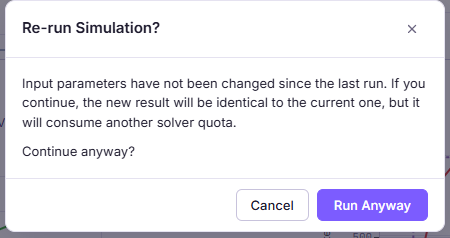
This exists purely to protect your allowance. Confirming runs it anyway, which is occasionally what you want.
When Your Allowance Resets
Your allowance resets monthly, anchored to your own date rather than to a shared calendar cutoff.
- On a paid plan, the reset follows your subscription’s billing cycle.
- On the free plan, it follows the date you first used the tool, rolled forward each month.
So if your cycle starts on the 22nd, your allowance refreshes on the 22nd. It does not refresh on the 1st of the month.
Checking What You Have Left
Your usage page shows current consumption against each allowance for the period, along with an activity log of individual actions. It is the authoritative view, since the enforcement runs against the same data.
When You Hit a Limit
The tool tells you which limit you reached and offers to upgrade. Nothing is lost: your inputs stay exactly where they are, and you can save your configuration to a file whether or not you have any allowance left.
If you upgrade in another tab, come back to the tool’s tab. It rechecks your plan when the tab regains focus, so the new allowance becomes available without a reload.
Choosing a Plan
The pricing page lists what each plan includes. Some guidance on shape rather than numbers:
- Evaluating the tool, or one project a quarter. The free plan is designed to be enough to reach a real conclusion on your own data, not just to click through a demo.
- Regular selection work. The middle plan raises every allowance. Screening candidate valves consumes runs quickly, since a proper screen is a dozen solves rather than one.
- Everyday use, or you want the assistant. The top plan is the only one including the AI assistant, which is worth having if you run parameter sweeps frequently. See AI Assistant.
Billing, invoices, and plan changes are handled on your billing page.