Valve Characteristic
A valve is described by four things in this tool: two flow curves, a type, and an opening pressure. This page covers how to supply them.
For what those quantities mean physically, and why there are two curves, read PRV Behaviour first.
Choosing a Data Source
Data Source switches between the built-in entries and your own data. Switching clears the other path’s selection.
Database Mode
Click Browse database…. Each entry lists its model, manufacturer, type, and opening pressure, and previews both flow curves so you can see the difference between the closed and open states before selecting.
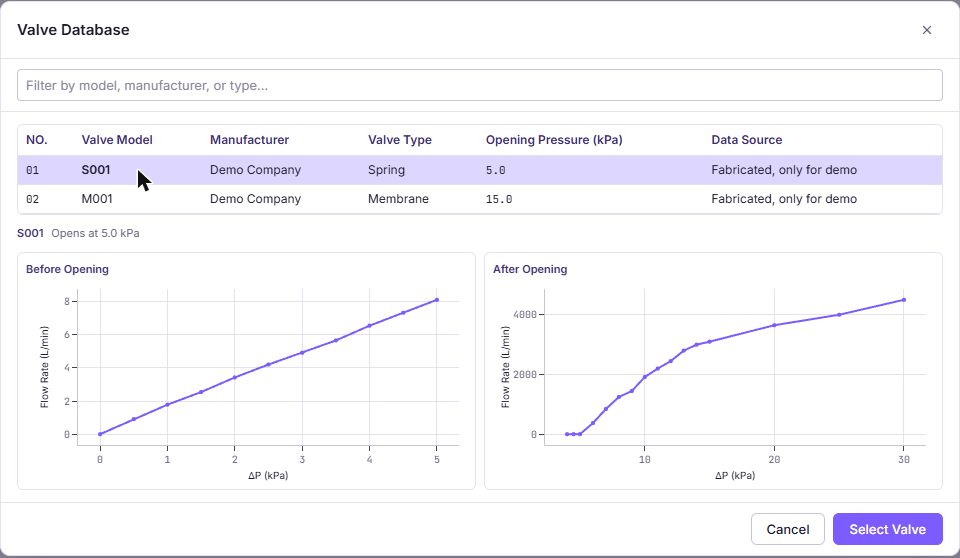
Your selection is remembered between visits. The built-in entries are fabricated sample data and must not be used for design work.
User Defined Mode
Four inputs appear, in this order.
P–Q Curve Before Opening
Flow through one valve while it is still closed. This is the small flow that passes through the breathing membrane and any leakage path.
dP (kPa),Flow Rate (L/min)
0,0
2,0.05
4,0.15
P–Q Curve After Opening
Flow through one valve once it has opened. Typically two to three orders of magnitude larger than the closed curve at the same differential pressure.
dP (kPa),Flow Rate (L/min)
0,0
2,8.4
4,15.9
Both curves use the same upload control and the same column mapping step as every other CSV in the tool. Choose your pressure unit from kPa, Pa, bar, or psi, and your flow unit from L/min, m³/s, m³/h, or CFM.
Validation Rules
| Rule | Applies to | Why |
|---|---|---|
| At least two columns, all headers unique | File | Columns are selected by name |
| Header row plus at least two data rows | File | Two points are the minimum for interpolation |
| Every cell is a finite number | File | |
| File is 2 MB or smaller | File | |
| Strictly increasing | Pressure column | Each differential pressure appears once |
| Starts at 0 or more | Pressure column | |
| Never decreasing | Flow column | Flow cannot fall as differential pressure rises |
| Starts at 0 or more | Flow column |
Valve Type
Spring recloses when pressure falls back. Membrane opens once and stays
open. See
PRV Behaviour for which one
your product corresponds to.
Opening Pressure
The setpoint, expressed relative to ambient, accepted between 0.5 and 50 kPa. A valve rated to open at 5 kPa above ambient is entered as 5 kPa, not as 106.325 kPa.
This value comes from your supplier datasheet. It is a property of the part you are evaluating, not a variable to adjust until the case passes.
Number of Valves
Multiplies the flow curve. Two valves pass twice the flow at the same differential pressure, and open at the same threshold.
The model assumes identical valves in identical conditions. It cannot represent a mix of different valves, and it cannot represent a valve mounted where the local pressure differs from the pack average.
Getting Curves From a Supplier
Datasheets frequently fall short of what the tool needs. Three things to ask for specifically:
Both curves, not one. Most datasheets show only the open flow. The closed curve matters for what happens before the setpoint is reached.
Enough of the range. The curve must cover the differential pressures your case actually reaches. When your case goes beyond the last measured point, the tool holds flow flat at that last value rather than extrapolating upward, which understates relief and pushes the predicted peak up. That is the safe direction to be wrong in, but it can reject a valve that would have passed.
Enough points around the knee. Relief flow often rises very steeply just above the setpoint. Two points either side of that transition are not enough to capture the shape, and the shape is what sets your peak.