Saving and Loading a Setup
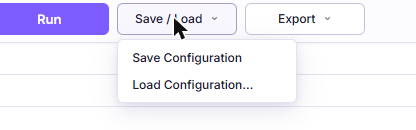
The Save / Load menu preserves a case so you can come back to it, share it, or reproduce it. It is the counterpart to Export, which preserves results.
| Menu item | What it does |
|---|---|
| Save Configuration | Downloads a .json file holding every input |
| Load Configuration… | Reads a file you pick and restores those inputs |
Neither costs anything against your plan, and neither sends anything to our servers.
What the File Contains
Every field in the workspace: pack geometry, ambient conditions, temperature mode, both data sources, database selections, cell and valve counts, and each unit you had selected.
Crucially, it also contains any curves you uploaded, in full. A configuration file for a case built on your own CSV data is self-contained. You do not have to keep the original CSVs beside it.
What the file does not contain is results. Reopening a configuration restores the inputs, and you press Run to produce results again.
The fields are written in the order they appear on screen, so the file is readable if you ever need to inspect or diff one by hand.
Loading
Choose Load Configuration… and pick a file. The Messages console confirms
which file was loaded.
Loading is deliberately forgiving. Each field is validated on its own, and a field that is missing or malformed is skipped, leaving the current value in place. A partially corrupted file therefore restores what it can rather than failing completely. The file is rejected outright only if it is not valid JSON, if it belongs to a different tool, or if nothing in it is recognisable.
Loading a configuration clears any results on screen, since they no longer correspond to the inputs.
Why There Is No Cloud Save
ThermoSketch does not store your simulation inputs or results on our servers at all, on any plan. There is no project list, no history, and no sync, and this is a deliberate design decision rather than a missing feature.
Pack geometry, cell venting behaviour, and valve selections are among the more sensitive things an engineering organisation holds. The most reliable way for us not to leak them is not to have them. We store your account and subscription details, and nothing about your simulations.
The practical consequences are worth being explicit about:
- Inputs and results live in the browser tab. Closing or reloading it discards them, and the browser warns you once when results are on screen.
- Saving a case means downloading a file to your own machine, and organising those files is your own filing decision.
- We cannot recover a case for you, because we never had it.
- Nothing prevents you keeping configuration files in your own version control alongside the rest of your design data, which is where they belong anyway.
Full details are on the security page.
The One Exception
If a solve or an export fails, the error dialog offers to send us the setup that failed so we can reproduce the problem. That is the only path by which simulation inputs reach our servers, and it requires you to confirm each time. Nothing is uploaded unless you click send. See Troubleshooting.
Suggested Practice
Save the configuration whenever a case is worth keeping, which in practice is any case you might be asked about later. It is free, instant, and the only way to reproduce a result exactly.
For a design review, keep three files together: the configuration for the inputs, the CSV for the numbers, and the PDF for the narrative.